

Web Analytics Made Easy - Statcounter

NaviAI Hub — AI Digital Products Marketplace | Sell AI Courses, Prompts & Templates Worldwide

Your Cart
We use cookies 🍪
We use cookies and other similar technologies to improve your browsing experience and the functionality of our site. Learn more in our Privacy Policy.

NexConverter-Yearly_Card

Any format in. Any format out. One click. Drag a video, audio track or image into NexConverter and turn it into whatever your device, editor or client needs — locally, in batch, at GPU speed.

Positioning

NexConverter is a desktop converter that speaks every media dialect. Think of it as a universal translator for files: a video arrives in MOV, your editor wants MP4; a song arrives in WAV, your phone wants MP3; a photo arrives in HEIC, your blog wants WEBP. NexConverter quietly handles all of it — 200+ formats, batch queues, quality controls, and zero cloud uploads.

The problem it kills

You get a file that simply will not open. A client sends an MOV your editor rejects. A phone records HEVC your old laptop chokes on. An image is HEIC but your website only takes JPG. You hunt for a sketchy online converter, upload private files to a random server, wait, and download a watermarked result. NexConverter ends that dance — it runs on your machine, processes in bulk, and never touches the cloud.

Core features

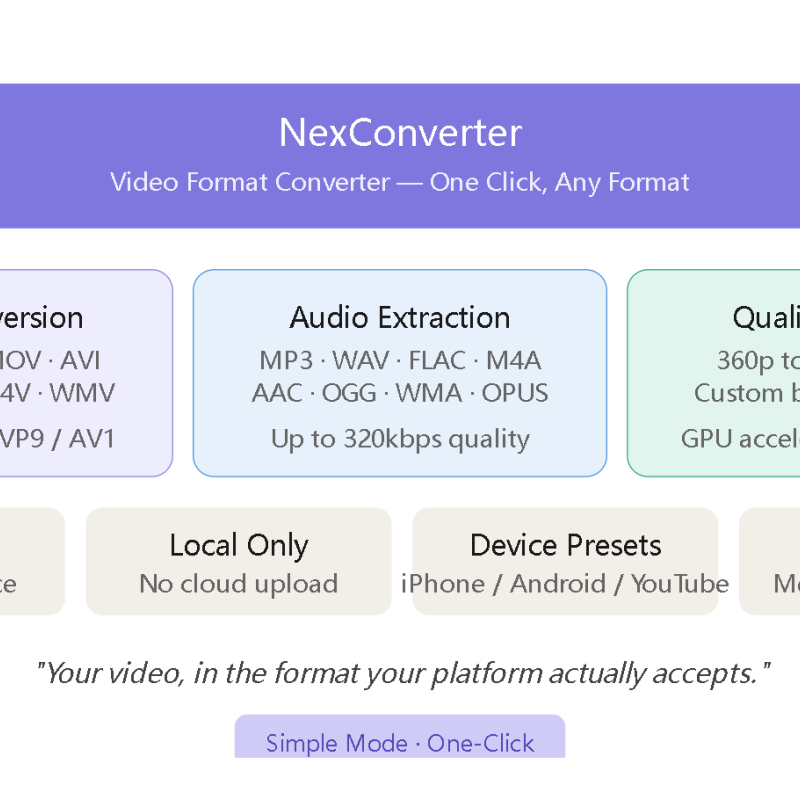
  • Universal format support (200+) — video (MP4, MKV, MOV, AVI, WebM, FLV, M4V), audio (MP3, WAV, FLAC, M4A, AAC, OGG), image (JPG, PNG, WEBP, HEIC, GIF, BMP, TIFF), across major codecs (H.264, H.265, VP9, AV1).
  • Batch queue — drop 100+ files at once, convert in sequence with per-file progress and a full log trail.
  • Fine-grained quality control — set resolution (up to 4K), bitrate (auto / fixed / CRF), audio sample rate, and compression level per job.
  • GPU acceleration — hardware encoding delivers up to 8x faster conversion than CPU-only tools.
  • One-click device presets — iPhone, Android, YouTube, Instagram, web — pick a profile and the right settings apply automatically.
  • Metadata preservation — keep tags, timestamps and subtitles where the format allows.
  • Local-only processing — nothing uploads to a server. Your files stay on your machine; privacy guaranteed.

Who it's for

Video editors & post-production · Musicians, podcasters & sound designers · Designers, photographers & e-commerce teams · Everyday users who just need a file to open

Short description (store snippet)

NexConverter is a universal desktop converter for video, audio and images — 200+ formats, batch processing, GPU acceleration, and per-file quality controls. Convert MOV to MP4, WAV to MP3, HEIC to JPG and more, all locally with no cloud upload. Any format in, any format out.

FAQ

QuestionAnswer
Which formats are supported?200+ across video (MP4, MKV, MOV, AVI, WebM, FLV), audio (MP3, WAV, FLAC, M4A, AAC, OGG) and image (JPG, PNG, WEBP, HEIC, GIF, BMP, TIFF), with codecs H.264/H.265/VP9/AV1.
Does it upload my files anywhere?No. All conversion runs locally on your machine. Nothing leaves your computer.
Can it convert many files at once?Yes — batch queue supports 100+ files, processed in sequence with per-file progress and a log.
How fast is it?With a compatible GPU, hardware encoding runs up to 8x faster than CPU-only conversion. CPU mode works without a GPU.
Can I control output quality?Yes — resolution (up to 4K), bitrate, audio sample rate and compression are all adjustable, plus one-click device presets.
Does it keep subtitles and metadata?Where the target format supports it, tags, timestamps and subtitles are preserved.

Call to action

Available now on NaviAi. Want to earn while you share? Join the NaviAi partner program and earn commission on every NexConverter sale.


Write a review

Note: HTML is not translated!
Rating
Bad Good